
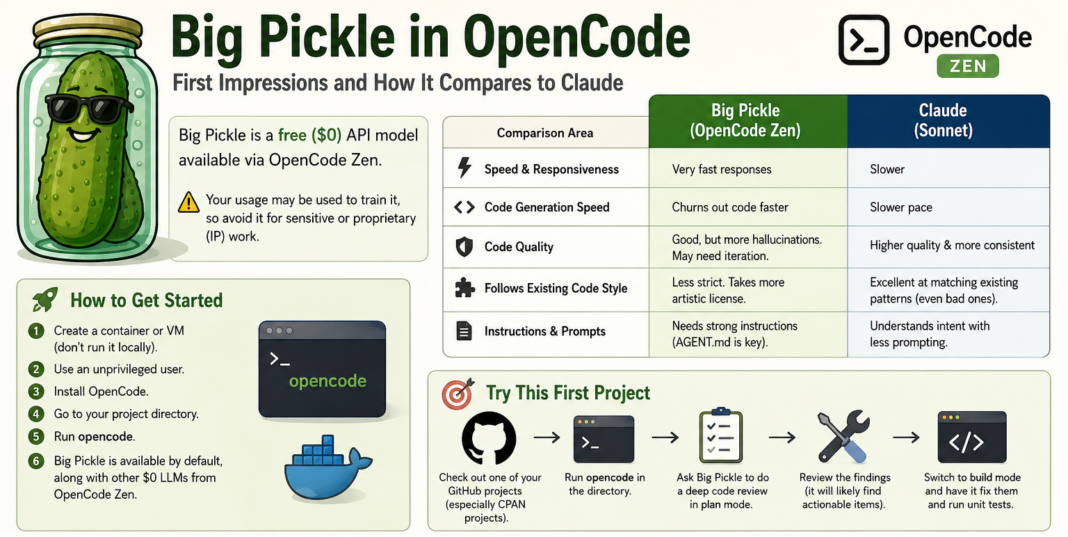

Is the Big Pickle model in OpenCode Zen actually good for development? In this review, I dive into my experience experimenting with this powerful $0 API model, which is quickly becoming a favorite for budget-friendly prototyping and coding experimentation.
While it offers incredible value, developers should note that usage data may be used for LLM training, making it a poor fit for proprietary data. Let’s look at how it stacks up in a head-to-head comparison: Big Pickle vs. Claude.
Big Pickle vs Claude: Key Differences
Speed and responsiveness
There’s a general consensus that Big Pickle responds very quickly, and my experience matches that. While I’m not putting exact benchmarks on it, it consistently feels faster than Claude in generating responses and iterating through changes.
It also tends to produce code at a noticeably higher pace, which can be useful for rapid prototyping.
Code quality and reliability
Claude (especially Sonnet) still leads in raw code quality and correctness. Big Pickle is good, but not quite at that level.
- It produces functional code, but with more frequent hallucinations
- It often requires iteration to stabilize outputs
- Once corrected, it can converge to solid solutions fairly quickly
In short: Claude is more consistent; Big Pickle is more “fast and fixable.”
Style and adherence to existing code
One of Claude’s biggest strengths is how well it mirrors existing code patterns—even when those patterns are messy or suboptimal. It tends to “fit in” with the surrounding codebase without much prompting.
Big Pickle is less rigid in that respect. It tends to introduce more variation and sometimes takes creative liberties instead of strictly following existing conventions.
This can be either helpful or disruptive depending on the project.
Prompt sensitivity and instructions
Big Pickle performs significantly better when given strong, explicit instructions, especially through an AGENT.md file. Without that structure, results can drift more than Claude.
Clear constraints make a noticeable difference in output quality.
How to get started with Big Pickle in OpenCode
If you want to try it yourself, a simple setup works best:
- Create a container or VM (avoid running it directly on your host system)
- Use an unprivileged user account
- Install OpenCode
- Navigate to your project directory
- Run
opencode - Select Big Pickle (enabled by default among OpenCode Zen’s $0 models)
Because OpenCode models can be quite “enthusiastic,” isolating them in a safe environment is strongly recommended.
A good first project to try
A practical way to evaluate it:
- Open an existing GitHub project (CPAN projects are a good test case)
- Run OpenCode in the repo directory
- Ask Big Pickle to perform a deep code review in plan mode
- Review the issues it identifies
- Switch to build mode and let it implement fixes
- Run unit tests to validate changes
This workflow gives a clear view of both its reasoning and execution ability.
Additional observations about OpenCode
A few broader patterns stood out:
- OpenCode models feel more “eager” than Claude, even when Claude models are used through OpenCode via GitHub integrations
- This behavior seems more tied to the OpenCode CLI interaction style than the models themselves
- The OpenCode GUI is still developing, but the CLI is strong and in some ways preferable
- The Claude CLI and VS Code plugin remain more polished, though OpenCode’s CLI is competitive
Plan mode vs build mode behavior
The distinction between OpenCode’s plan mode and build mode is very strict.
- In plan mode, it will only plan—even if you explicitly ask it to write code
- In build mode, it tends to interpret even questions as instructions
Claude, by contrast, is better at interpreting intent and tone within a single mode. It more naturally distinguishes between “just asking” and “please implement.”
Big Pickle isn’t a Claude replacement, but it’s an interesting alternative for:
- Fast iteration
- Low-cost experimentation
- Automated code review and patch cycles
Claude still wins on consistency and structure, but Big Pickle offers speed and flexibility that can be useful in the right workflow.